Title
TODO: Update
Content
Any title provides:
- option to define its heading-layer (optional - default is h2)
- a headline (mandantory)
- a subheadline (optional)
- a link (optional)
Heading-layer
Can be set from h1 up to h6.
h1 defines the most important heading. h6 defines the least important heading.
Search engines use the headings to index the structure and content of the web page.
Users often skim a page by its headings. It is important to use headings to show the document structure.
h1 headings should be used for main headings, followed by h2 headings, then the less important h3, and so on.
When set to Disabled the whole Title area will vanish.
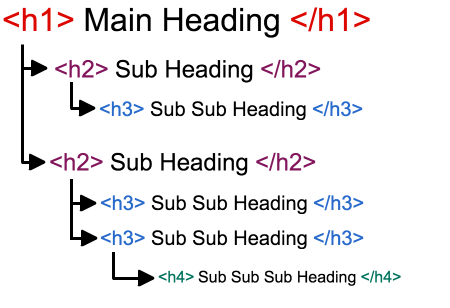
only one h1 per page
Headline
The text inside the Heading-layer.
It is possible to have custom linebreaks by adding two spaces at the end of the line, the following text will start in a new line.
Subheadline
The text below the Headline which gives additional context and an understanding to the Headline.
Also capable of linebreaks by adding two spaces at the end of the line.
Found a missing/undocumented part or have any suggestions/improvements to make? Please report it to: hewlik@conenergy.com
Fehler gefunden? Möchten Sie diese Seite verbessern? Wenden Sie sich an agentur-internet@conenergy.com